
A GemBet account never expires, but it can go inactive, and it cannot be removed with a button. This page answers each of the account cases our live chat handles: an account left alone for more than 12 months, a player who wants to close one, verification of ID and bank details, and the security settings that keep everything locked down. Each section ends with the next move, which is normally Log In, Settings or live chat.
GemBet inactive account: how to get back in
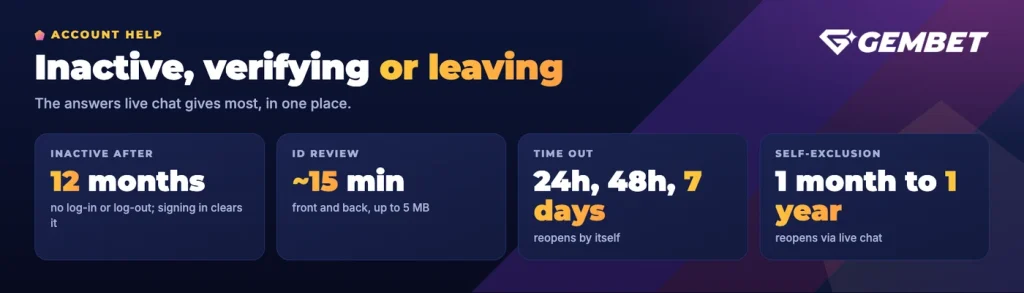
A GemBet inactive account is one where more than 12 consecutive months pass with no log-in and no log-out. Nothing is charged for that, and nothing is taken away. Inactivity is simply a status, and signing in again clears it.
Start with Log In at the top of this site. If you registered with Continue with Google, use that button rather than a password, because your sign-in still runs through Google even though your username on the platform is the one you chose at sign-up.
If the password is gone, you can reset your password from the log-in window; a new one has to be at least 8 characters. Live chat can also help if the reset email does not reach you, for example when the address on the account is an old one you no longer open.
Once you are back inside, open Account Details and read through your information. Your name, country, email address and phone number all have to be current, because they are the details we check later against your ID and your bank account.
How to delete a GemBet account, and what to use instead
There is no self-service closure option, so a player looking for a GemBet delete account option will not find a delete button in the menus. What exists instead is a set of tools that stop play for a fixed period, plus a permanent route handled by our team. Which one is right depends entirely on why you want to leave.
If you want a break or you worry about your play
Everything here sits under Settings > Responsible Gaming. A Time Out locks the account for 24 hours, 48 hours or 7 days and then reopens it automatically. Self-Exclusion runs longer, from 1 month up to 1 year, and a self-excluded account reopens only through live chat once the period has finished and a further 24-hour cooling-off has passed. You can also cap what goes in with a daily, weekly or monthly deposit limit, which is the lighter option if the problem is pace rather than the game itself.
A Time Out cannot be reversed once it starts. That is the point of it, so choose the length before you confirm it rather than after.
If you want play to end for good on gambling-harm grounds, ask live chat for a permanent closure. That decision is final and the account cannot be reopened afterwards, so read through the responsible gaming tools before you request it.
If you are leaving after a bad experience
Talk to live chat first and say plainly what went wrong. A held withdrawal, a bonus that behaved differently from how you read it, or a deposit that never arrived are all things an agent can look up on your account and act on.
Before you ask for closure
Withdraw your balance before you ask, so no ringgit is left on an account you no longer plan to use.
GemBet verification: your ID and bank account
Verification lives behind your profile icon, under Verification. It exists because payments only ever move to and from the account holder, so your identity and your bank details have to line up with the name on the account. Everything in this section applies to ringgit accounts opened from the Malaysia homepage.
ID card or passport
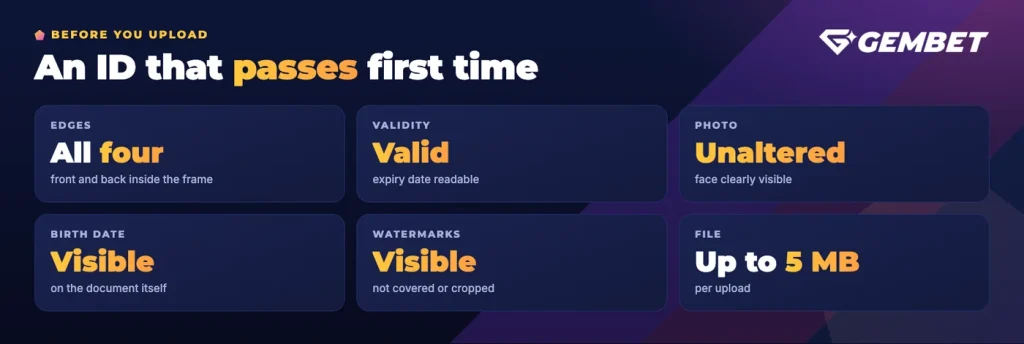
Choose Add ID Card or Passport and upload the front and the back. Most rejections are avoidable, so check the image before you send it.
| Document | Requirement |
|---|---|
| ID card or passport | Front and back, every edge inside the frame |
| Validity | Still valid, with the expiry date readable |
| Photo | Unaltered, your face clearly visible |
| Date of birth | Visible on the document itself |
| Watermarks | Visible, not covered or cropped out |
| File | Up to 5 MB per upload |
Documents are reviewed in around 15 minutes, so in practice you can upload and wait rather than coming back tomorrow. Age is part of that review: GemBet is for players aged 18 and over, and proof of age can be asked for at any point.
Bank account
Open Bank Details, then Add Bank Account, pick your bank from the list and enter the account number. The holder name is filled in automatically from your profile, which is why the two have to match; third-party accounts are not accepted. No bank statement is needed for the standard check, though an upload field is there and further documents can be requested in some cases. A verified bank account is required before any bank withdrawal, and it also raises your withdrawal limit.
Verification, your security menu and the responsible gaming settings all sit in the same account area.
GemBet 2FA and account security
A password is the weakest part of any account, so the single most useful thing you can do is switch on GemBet 2FA. It uses an authenticator app on your phone.
- Open the security menu. Go to Settings > Security and switch on the authentication app.
- Confirm by email. A 6-digit code is sent to your registered address and stays valid for 30 minutes.
- Link the app. Scan the QR code, or type the setup key into an authenticator app such as Google Authenticator.
- Enter the app code. The 6-digit code shown in the app completes the setup.
- Every log-in after that. The app code is requested alongside your password, so a stolen password on its own is no longer enough.
If you think someone has your password, change it straight away and then tell live chat, because we can block the account temporarily while it is sorted out. Also note: when several players sign in from the same IP address, the pattern can look like collusion and trigger a review with an ID request. It is not an accusation, but it does slow things down, so avoid sharing a connection for play where you can.
One rule to remember
Keep the authenticator code to yourself. It is the part of your log-in that a stolen password cannot replace.
One account per player
Each player holds a single account, and the rule is enforced. Where more than one account is opened by the same person, payouts on those accounts stop until a fine of 10% of total deposits has been settled, after which the funds are moved back to the primary account.
The most common accidental duplicate is easy to rule out. If you sign in with Continue with Google using an email that already has an account, you are logged into that same account; a second one is never created. The same goes for a forgotten password: reset it or ask live chat instead of registering again. If you believe a duplicate already exists in your name, raise it with live chat yourself rather than waiting for a review to find it.
FAQ
When does a GemBet account become inactive?
After more than 12 consecutive months with no log-in and no log-out. Signing in again is all it takes to bring the account back into normal use. There is no inactivity charge.
How do I delete my account?
There is no self-service delete button. If you want to stop playing, use Self-Exclusion or a Time Out under Settings > Responsible Gaming. A permanent closure on gambling-harm grounds is arranged through live chat and cannot be undone, so withdraw your balance first.
How long does ID verification take?
ID documents are reviewed in around 15 minutes. Uploads are rejected when a corner is cropped, the expiry date or date of birth is hidden, a watermark is covered, or the file is larger than 5 MB.
Do I need a bank statement to add a bank account?
No. The standard check asks only for your bank and your account number, and the holder name is filled in from your profile. Additional documents can be requested in some cases, and the name on the bank account must match the account name.
How do I turn on two-factor authentication on GemBet?
Open Settings > Security and enable the authentication app. Confirm with the 6-digit code emailed to you, which is valid for 30 minutes, then scan the QR code or enter the setup key in an authenticator app such as Google Authenticator. Every later log-in asks for the 6-digit app code.